Agile/ Scrum Methodology
What Is Agile?
The Agile movement proposes alternatives to traditional project management. Agile approaches are typically used in software development to help businesses respond to unpredictability.
What is Scrum?
Scrum is the most popular way of introducing Agility due to its simplicity and flexibility.
Actors
Product Owner
The Product Owner is responsible for continuously communicating the vision and priorities to the development team.
Scrum Master
- Is not project manager, he is facilitator.
- Helping the Product Owner maintain the product backlog in a way that ensures the project is well defined and the team can continually advance forward on the project at any given time
- Determine the definition of done for the project with input from the entire Scrum team
- Coaching the team within the Scrum principles in order to reach the defined ‘done’
Team
- 3 to 9 members with cross-functional skills who do the actual work (analyse, design, develop, test, technical communication, document, etc.).
- Self organizing.
- Collaborates.
At CME:
- Sprint planning meeting.
- Pull the higher priority stories from backlog.
- Break down epic stories in to smaller stories.
- Story points. Assign points (1,2,3,5,8,13,21,34,45). BA, Developers, QAs have to agree on the points.
- Story assignment and break down stories into smaller tasks.
- Daily 15 mins meeting.
- Report to the team the status.
- Report issues or road blocks.
- (Change recently) Write test cases with QAs and use that as requirements.
- Design, Coding and Testing in 3 to 4 weeks. Total of 4 people.
- Demo to product owner and stakeholders for feedback.
- Deploy in prod.
- Sprint retrospective: what went well or need improvement.
Ref:
Scrum methodology
http://www.scrummethodology.com/
Core Java Interview Links
115 Java Interview Questions and Answer – Core
Object Oriented Design
Strive for highly cohesive and loosely couple solution, code or design.
Cohesiveness (Of Class Modules)
Degree to which the elements of a module belong together. Degree to which a class has a single, well-focused purpose. Higher the cohesiveness of the class, better is the OO design.
Example high cohesive
class MyReader{
 public MyData readFromDisk(Parameter fileName){...};
 public MyData readFromWeb(Parameter url){...};
 public MyData readFromNetwork(Parameter networkLoc){...};
}
Look how well-focused the class is in its purpose. The class is named “MyReader” and its intended purpose is to read the resource, and it does only so. It does not implement other things.
Example lower cohesive.
/*
 * lower cohesion example (probably)
 */
class MyReader{
 //validate the resource path
 public boolean validateLocation(String path){
  return ping(pathIP) && checkFTP(path);
 }
 private static boolean ping(String path){...};
 private static boolean checkFTP(String path){...};

 //read the resource
 public MyData readFromDisk(String fileName){...};
 public MyData readFromWeb(String url){...};
 public MyData readFromNetwork(String networkAddress){...};
}
Read operations are well defined, but it also implements logic to validate path. This is just an example and describes lower cohesion, wherein, a class intended for a specific functionality is also involved in other operations.
Benefits of higher cohesion:
- The objective of the class is easily understandable and enhances the readability.
- The re-usability factor is highly increased, since a highly cohesive class is considered to be almost complete in its objective.
- Further code changes or enhancement becomes very easy.
Coupling (Of Classes)
Degree to which one class knows about another class. Spring promotes loosely coupled class because you don’t have to use new to instantiate another class that is needed.
Ref:
10 Best object oriented Design Principles
http://www.javacodegeeks.com/2012/08/10-object-oriented-design-principles.html
High cohesive and loose coupling examples
http://javabambino.blogspot.com/2013/06/loose-coupling-and-high-cohesion-in-java.html
Java OOP Concept
4 OOP principal concepts: A-PIE: Abstraction, Polymorphism, Inheritance and Encapsulation.
Ref: http://www.codeproject.com/Articles/22769/Introduction-to-Object-Oriented-Programming-Concep
Abstraction
- Principle of generalization.
- Concept of thinking about the most basic information and function of an object e.g. car.
- Achieved in Java by “interface” and “abstract” class, something that are not concrete or complete but contains common functionalities of the sub classes.
- Helpful to strips everything down to its most basic principles. This can help when encapsulating functionality of an object because it can help identify the important information that should be made visible and the unimportant information which can be made hidden.
- Helps with the “Don’t Repeat Yourself principle”. By taking what a group of objects have in common and abstracting it, we can help prevent redundant code in each object which in turn creates more maintainable code.
Polymorphism
- Ability of a variable, function or object to take on multiple forms. Allows developers to program in the general rather than program in the specifics see example below.
- Real life example of one name multiple forms:
A Teacher behaves to student.
A Teacher behaves to his/her seniors.
Here teacher is an object but attitude is different in different situation. - Closely related to inheritance.
In effect, polymorphism trims down the work of the developer because he can now create a sort of general class with all the attributes and behaviors that he envisions for it. When the time comes for the developer to create more specific subclasses with certain unique attributes and behaviors, the developer can simply alter code in the specific portions where the behaviors will differ. All other portions of the code can be left as is.
(Inheritance, Overloading and Overriding are used to achieve Polymorphism in java). Polymorphism manifests itself in Java in the form of multiple methods having the same name.
- Overload. Multiple methods have the same name, but different formal argument lists (overloaded methods). Java does not allow overloading return type.
- Override. Multiple methods have the same name, same return type, and same formal argument list (overridden methods) but the logic is different. Overriding can be achieved through inheritance and interface.
Parent class reference is used to reference to child class Object.
public interface Vegetarian{}
public class Animal{}
public class Deer extends Animal implements Vegetarian{}

// A Deer IS-A Animal
// A Deer IS-A Vegetarian
// A Deer IS-A Deer
// A Deer IS-A Object

// The following are legal (object = same level or lower object)
Deer d = new Deer();
Animal a = d;          // Upcast same as Animal a=(Animal) d but Upcast always legal and do not need to specify any casting.
Vegetarian v = d;   // Upcast
Object o = d;         // Upcast

Deer d2=(Deer) new Animal(); // Downcast. This will cause run time ClassCastException.
Deer d3=(Deer) a; // Downcast. This will be correct since a is really pointing to object d which is a Deer.
Inheritance
- Allow subclass to inherit super class’ commonly used states and behaviors.
- Derive your new class from the already existing code.
Java does not support multiple inheritances. Multiple inheritances could lead to diamond problem. Let’s say A is the super class of B and C & D is a subclass of both B and C. D inherits properties of A from two different inheritance paths i.e. via both B & C. This leads to ambiguity and related problems, so multiple inheritances is not allowed in Java.
How java solve multiple inheritance
Interface
Simulated with the use of interface, not a true multiple inheritances since the class has to implement the methods from the interfaces.
MixIn: Using Program to Interfaces, Object Composition, Method Delegation.
package com.pifl.exercise.multipleinheritance;

/**
 * Java Multiple Inheritance (Mix In) using Program to Interfaces, Object Composition, Method Delegation.
 * http://codeoftheday.blogspot.com/2013/07/emulating-multiple-inheritance-in-java.html
 */
public class MultipleInheritanceMixin {
	interface Employee{
		public Integer getEmployeeId();
		public void setEmployeeId(Integer id);
	}

	class EmployeeImpl implements Employee{
		Integer id;
		@Override
		public Integer getEmployeeId() {
			return id;
		}

		@Override
		public void setEmployeeId(Integer id) {
			this.id=id;
		}
	}

	interface Architect{
		public void design();
	}

	class ArchitectImpl extends EmployeeImpl implements Architect{
		@Override
		public void design() {
			// Architect design activity
		}
	}

	interface Developer{
		public void develop();
	}

	class DeveloperImpl extends EmployeeImpl implements Developer{
		@Override
		public void develop() {
			// Developer activity
		}
	}

	/**
	 * ArchitectDeveoper consists of Architect and Developer roles.
	 */
	interface ArchitectDeveloper extends Architect, Developer{};

	/**
	 * Multiple inheritance using Interfaces, Composition and Delegation.
	 */
	class ArchitectDeveloperImpl extends EmployeeImpl implements ArchitectDeveloper{
		// Composition
		private Architect architect;
		private Developer developer;

		@Override
		public void design() {
			// Delegate design to architect object.
			architect.design();
		}

		@Override
		public void develop() {
			// Delegate developer to developer object.
			developer.develop();
		}

		public Architect getArchitect() {
			return architect;
		}
		public void setArchitect(Architect architect) {
			this.architect = architect;
		}
		public Developer getDeveloper() {
			return developer;
		}
		public void setDeveloper(Developer developer) {
			this.developer = developer;
		}
	}
}
Ref:
http://codeoftheday.blogspot.com/2013/07/emulating-multiple-inheritance-in-java.html
http://hannesdorfmann.com/android/java-mixins
Encapsulation
AKA Information Hiding. Packing of properties and methods into a single unit/ class. It allows selective hiding of these properties and methods to avoid corruptions. Access control can be achieved by the following access specifiers:
- At the top level (outer class level) – public, or package-private (no explicit modifier).Package-private can be accessed by member of same package.
- At the member level incl inner class—public, private, protected, or package-private (no explicit modifier). Package-private has same restiction as above. Protected member can also be accessed by member of same package, in addition, by a subclass of its class in another package.
Abstraction Vs Encapsulation
| Abstraction | Encapsulation |
| 1. Abstraction solves the problem in the design level. | 1. Encapsulation solves the problem in the implementation level. |
| 2. Abstraction is used for hiding the unwanted data and giving relevant data. | 2. Encapsulation means hiding the code and data into a single unit to protect the data from outside world. |
| 3. Abstraction lets you focus on what the object does instead of how it does it | 3. Encapsulation means hiding the internal details or mechanics of how an object does something. |
| 4. Abstraction– Outer layout, used in terms of design.
For Example: Outer Look of a Mobile Phone, like it has a display screen and keypad buttons to dial a number. | 4. Encapsulation– Inner layout, used in terms of implementation.
For Example: Inner Implementation detail of a Mobile Phone, how keypad button and Display Screen are connect with each other using circuits. |
| Implement in Java using interface and abstract class | Implement in Java using private, package private and protected access modifier. AKA data hiding. |
Java Specific Concept
Overload
- Multiple methods have the same name, but different formal argument lists (overloaded methods) within same class. Java does not allow overloading return type.
- Changing the return type of method is not overloading.
- Changing/ adding Thrown Exception from methods is not overloading.
Overriding
- Ability to define behavior that’s specific to subclass type. Override the functionality of existing methods, i.e. override parent class methods that are not marked as final.
- Overridden methods must have same name, same return type, and same formal argument list (overridden methods) but the logic is different. Overriding can be achieved through inheritance and interface.
Rules for overriding:
- Methods profile should be the same, i.e. return type, parameters.
- Exception:
- If the superclass method does not declare an exception, subclass overridden method cannot declare the checked exception but it can declare unchecked exception.
- If the superclass method declares an exception, subclass overridden method can declare same, subclass exception or no exception but cannot declare parent exception.
- Ref: https://www.javatpoint.com/exception-handling-with-method-overriding
- Private, static and final cannot be overridden.
- Constructor cannot be overridden.
- If a method cannot be inherited, then it cannot be overridden.
class Animal{
   public void move(){
      System.out.println("Animals can move");
   }
}
class Dog extends Animal{
   public void move(){
      System.out.println("Dogs can walk and run");
   }
   public void bark(){
      System.out.println("Dogs can bark");
   }
}

public class TestDog{
   public static void main(String args[]){
      Animal a = new Animal(); // Animal reference and object
      Animal b = new Dog(); // Animal reference but Dog object
      a.move();// runs the method in Animal class
      b.move();//Runs the method in Dog class
      b.bark();
   }
}
b.bark() will throw a compile time error since b's reference type Animal doesn't have a method by the name of bark.- A subclass within the same package as the instance’s superclass can override any superclass method including default access (package-private) modifier that is not declared private or final. Example default access modifier:
public class Animal{
   void move(){…}  // This has default access modifier (no private, public etc. before void)
}
- A subclass in a different package can only override the non-final methods declared public or protected.
- Super keywords can be used to invoke super-class overridden methods. E.g. super.printMethods(), super(params) // to call parent class constructor
Static Methods
- Can be overload-ed
- Cannot be overridden.If a derived class defines a static method with same signature as a static method in base class, the method in the derived class hides the method in the base class. The static methods is re-declared.
- An instance method cannot override a static method, and a static method cannot hide an instance method. For example, the following program has two compiler errors.
/* Java program to show that if static methods are redefined by
   a derived class, then it is not overriding but hidding. */

// Superclass
class Base {

    // Static method in base class which will be hidden in subclass
    public static void display() {
        System.out.println("Static or class method from Base");
    }

     // Non-static method which will be overridden in derived class
     public void print()  {
         System.out.println("Non-static or Instance method from Base");
    }
}

// Subclass
class Derived extends Base {

    // When static is removed here, it will cause Compiler Error.
    public void display() {
        System.out.println("Non-static method from Derived");
    }

    // When Static is added here, it will cause Compiler Error.
    public static void print() {
        System.out.println("Static method from Derived");
   }
}
Private Methods
- Sub-class cannot override base class private methods.
class Base {
 private void fun() {
 System.out.println("Base fun");
 }
}

class Derived extends Base {
 private void fun() {
 System.out.println("Derived fun");
 }
 public static void main(String[] args) {
 Base obj = new Derived();
 obj.fun();
 }
}

//We get compiler error “fun() has private access in Base”.- Inner class cannot override private methods but they are bonded.
/* Java program to demonstrate whether we can override private method
   of outer class inside its inner class */
class Outer {
     private String msg = "GeeksforGeeks";
     private void fun() {
          System.out.println("Outer fun()");
     }

     class Inner extends Outer {
         private void fun()  {
               System.out.println("Accessing Private Member of Outer: " + msg);
         }
     }

     public static void main(String args[])  {

          // In order to create instance of Inner class, we need an Outer
          // class instance. So, first create Outer class instance and then
          // inner class instance.
          Outer o = new Outer();
          Inner  i   = o.new Inner();

          // This will call Inner's fun and will access private members of
          // Outer's msg.
          i.fun();

          System.out.println("-------------------------");

          // o.fun() calls Outer's fun (No run-time polymorphism).
          o = i;
          o.fun();
     }
}

/*
The output:
Accessing Private Member of Outer: GeeksforGeeks
-------------------------
Outer fun()
*/
In the above program, we created an outer class and an inner class. We extended Inner from Outer and created a method fun() in both Outer and Inner.
If we observe our output, then it is clear that the method fun() has not been overriden.
It is so because private methods are bonded during compile time and it is the type of the reference variable – not the type of object that it refers to – that determines what method to be called.
As a side note, private methods may be performance-wise better (compared to non-private and non-final methods) due to static binding.
- Static binding (happened at compiled time) occurs for static, final and private methods. See: http://www.geeksforgeeks.org/static-vs-dynamic-binding-in-java/
Abstract
- Contains the common functionality of a collection of child classes. All components are the same as regular class i.e. constructor, methods, properties etc. E.g.:
public abstract class Employee{
   private String name;
   public Employee(){}; // constructor
   abstract public void setBadge(int number); // abstract method
   public void setName(String name){
      this.name=name;
   }
}- Cannot be instantiated and need to be sub-classed.
- All abstract methods have to be implemented.
- Promote: re-usability, removing duplications. Abstract class defines default behaviors. Usually is used in framework design.
- Vs interface AKA “pure abstraction”
- Abstract class can extends another abstract class
public abstract class A extends B implements IA{
}
public class B extends C{
}
public class C{
}
Interface
A contract between objects on how to communicate with each other. AKA “pure abstraction” since it does not have concrete methods, only definition of it.
Usage:
- Encode similarities which different classes are shared, but not necessarily constitute class relationship e.g:
- Human and parrot whistle but would not make sense to represent Human and Parrot as subclass of Whistle, rather Human and Parrot implement Whistle.
- JxpCheckoutPage and BxpCheckoutPage is subclass of ScraperPage but both implements ICheckoutPage to make sure every methods that is common and necessary for checkouts are implemented.
- In EPS, DailyLimitDAO is used by DailyLimitAlgo to get data from database. DailyLimitDAOJdbcImp implements DailyLimitDAO with JDBC Sql queries. DailyLimitDAO can also be implemented by other non JDBC maybe using hibernate without changing DailyLimitAlgo. DailyLimitAlgo is associated with DailyLimitDAO via Setter Injection.
- In Safe pass, OneSpanToken class implements Push and MobileActivation, in addition to regular Token implementation (such as validate, generateOTP etc.).
- Allow to use Object without knowing its type of class. E.g. in factory pattern.
- As callbacks. As Java does not allow passing of methods in the arguments. E.g. in event driven programming class A wanted to be notified if an event happen. Class B will signal the event when it happens.
public interface InterestingEvent{
   public void interestingEvent ();
}

public class EventNotifier{
   private InterestingEvent ie;
   private Boolean somethingHappened;
   public EventNotifier (InterestingEvent event){
      // Save the event object for later use.
      ie = event;
      // Nothing to report yet.
      somethingHappened = false;
   }

   public void doWork (){
      if (somethingHappened){
      // Signal the even by invoking the interface's
      // method.
      ie.interestingEvent ();
      }
      //...
   }
   // ...
}

public class CallMe implements InterestingEvent{
   private EventNotifier en;
   // Define the actual handler for the event.
   public void interestingEvent () {
      // Do something...
   }
   //...
}

// Main class to call all classes
public class MainClass{
   public static void main(String[] args) {
      CallMe me = new CallMe();
      EventNotifier eventNotifier = new     EventNotifier(me);
      While(waiting for event)
        eventNotifier.doWork();
   }
}
- Use in Factory pattern (see below).
Characteristic:
- Cannot be instantiated.
- Does not contain any constructors.
- All fields in interface is implicitly public static & final e.g. String COLOR=”BLUE”.
- All of the methods are abstract and implicitly public (even if you leave out public keyword) and no implementations.
- Cannot contain instance fields.
- An interface is not extended by a class; it is implemented by a class.
- Interface can “extends” (not implements) another interfaces
public interface IA extends IB{
}
public interface IB{
}
E.x. of interface:
//Any number of import statements
import java.lang.*;
public interface NameOfInterface{
   //Any number fields which will be implicitly public static final
   String COLOR=”BLUE”;
   //Any number of abstract method declarations
   abstract public void addToCart(String stockNumber, int quantity);
   // Does not have to have abstract keyword
   public void goToAddToCart();
}
Abstract Vs Interface
| Abstract Class | Interface |
| Methods can be implemented. | Pure abstraction, all methods are abstracts and cannot be implemented. |
| Can have constructor. | Cannot have constructor |
| Can have private, default, protected and public modifier. | Methods’ modifier is by default public. Attributes/ fields modifiers is by default public, static and final. |
| Sub-class cannot extends multiple abstract classes. | Sub-class can implement multiple interfaces. |
| Usable for code re-use | Usable for type declaration |
| New methods can be added as default and will not brake sub-classes. | New methods will required all sub-classes to implements the methods. |
When to use Abstract class and interface
Here are some recommendations to help you to decide whether to use an interface or an abstract class to provide polymorphism for your components:
- If you have a lot of methods and want default implementation for some of them, then go with abstract class
- If you want to implement multiple inheritance then you have to use interface. As java does not support multiple inheritance, subclass can not extend more than one class but you can implement multiple interface so you can use interface for that.
- If your base contract keeps on changing, then you should use abstract class, as if you keep changing your base contract and use interface, then you have to change all the classes which implements that interface.
- If you anticipate creating multiple versions of your component, create an abstract class. Abstract classes provide a simple and easy way to version your components. By updating the base class, all inheriting classes are automatically updated with the change. Interfaces, on the other hand, cannot be changed once created. If a new version of an interface is required, you must create a whole new interface.
- If the functionality you are creating will be useful across a wide range of disparate objects, use an interface. Abstract classes should be used primarily for objects that are closely related, whereas interfaces are best suited for providing common functionality to unrelated classes.
- If you are designing small, concise bits of functionality, use interfaces. If you are designing large functional units, use an abstract class.
- If you want to provide common, implemented functionality among all implementations of your component, use an abstract class. Abstract classes allow you to partially implement your class, whereas interfaces contain no implementation for any members.
Composition vs Inheritance
Favor composition over inheritance is one of the popular object oriented design principal. Reasons:
1 . Inheritance can breaks the encapsulation (weak encapsulation). If a subclass depends its behavior on super class and when the behavior of the super class change, the functionality in the sub class is broken. For example we want to have a class which will encrypt an object before putting it in the HashSet. We can do it 2 ways shown below. Both will involved creating our custom class EncryptedHashSet.
Inheritance (is-a relationship): Override add()
public class EncryptedHashSet extends HashSet{
   .....
   @Override
   public boolean add(Object o) {
      return super.add(encrypt(o));
   }
}
Composition (has-a relationship): Contains HasSet as member variable.
public class EncryptedHashSet implements Set{
   private HashSet container;
   public boolean add(Object o) {
      return container.add(encrypt(o));
   }
   public boolean addAll(Collection c) {
      return conatainer.add(encrypt(c));
   }
   .......
}
Suppose HashSet has the following where addAll() will use add()
public class HashSet implements set{
   ...
   public boolean add(Object 0){
      ...
   }

   public boolean addAll(Collection c){
      ...
      for(Object o: c){
         ...
         if(! add(o))
            return false;
      }
   }

}
If nothing change in the HashSet then the inheritance implementation is good but let’s say the super class HashSet addAll() do not call add() anymore then the implementation using inheritance will break since now calling addAll() will not use the encryption.
2. Simulate multiple inheritance. Since you can only extend one class in Java, but if you need multiple functionality like e.g. for reading and writing character data into file, you need Reader and Writer functionality and having them as private members makes your job easy.
3. Composition offers better unit test-ability than inheritance. If one class is composed of another class, you can easily create Mock Object representing composed class for sake of testing. Inheritance doesn’t provide this luxury. In order to test derived class, you must need its super class.
4. Flexibility. If you use Composition you are flexible enough to replace implementation of Composed class with better and improved version. One example is using Comparator class which provides compare functionality. if your Container object contains a Comparator instead of extending a particular Comparator for comparing , its easier to change the way comparison is performed by setting different type of Comparator to composed instance, while in case of inheritance you can only have one comparison behavior on runtime, You can not change it runtime.
If you are looking for code reuse and “has-a” relationship the use composition.
Example: Decorator Pattern
Choosing Between Composition Vs Inheritance
- Inheritance models “is-a” relationship. Only use when something is a constant/ permanent “is-a” relationship throughout the application e.g. Apple is a Fruit always.
- An impermanent is-a relationship can be modeled with composition “has-a” relationship. For example, you might think that an Employee is-a Person, when really Employee represents a role that a Person plays part of the time. What if the person becomes unemployed? What if the person is both an Employee and a Supervisor? This impermanent relationship can be modeled with composition.
Garbage Collections
- To discards objects that are no longer needed.
- Finalized() method in class is called by GC before releasing the object memory, it is advisable to release resource held by the object in the finalized() e.g. closing file handlers or connections.
- An Object is eligible for GC when there is no reference to the object. When you set the variable to null.
- GC cannot be forced it is an automatic process and no guarantee when the object is free.
- It is not advisable to instantiate object or declares variables inside a loop since this could consume memory faster than GC can free memory.
- GC can be requested by calling System.gc() and Runtime.gc() but it is not guarantee that JVM will do it.
- GC is done by a daemon thread.
GC Eligibility:
- Any objects that has no reference or cannot be reached by a live thread. E.g. set reference to the object to null.
- Circularly referenced instances that cannot be reached by any other instances.??. Ref: http://javapapers.com/java/how-java-garbage-collection-works/
- Object is created inside a block and reference goes out of scope when program exist the block.
- Parent object set to null. If an object A hold a reference to another object B and object A is set to null.
- If an object has only live weak references via WeakHashMap it will be eligible for garbage collection. Ref: http://javarevisited.blogspot.com/2011/04/garbage-collection-in-java.html#ixzz3S7tFaY7b
References in Java:
- Strong Reference. Suitable for caches – Not eligible for garbage collection.
- Soft – Eligible but as last option if memory is needed badly.
- Weak. Suitable for storing meta data – Eligible.
- Phantom – Eligible.
Example program for GC scope
Class GCScope {
	GCScope t;
	static int i = 1;

	public static void main(String args[]) {
		GCScope t1 = new GCScope();
		GCScope t2 = new GCScope();
		GCScope t3 = new GCScope();

		// No Object Is Eligible for GC

		t1.t = t2; // No Object Is Eligible for GC
		t2.t = t3; // No Object Is Eligible for GC
		t3.t = t1; // No Object Is Eligible for GC

		t1 = null;
		// No Object Is Eligible for GC (t3.t still has a reference to t1)

		t2 = null;
		// No Object Is Eligible for GC (t3.t.t still has a reference to t2)

		t3 = null;
		// All the 3 Object Is Eligible for GC (None of them have a reference.
		// only the variable t of the objects are referring each other in a
		// rounded fashion forming the Island of objects with out any external
		// reference)
	}

	protected void finalize() {
		System.out.println("Garbage collected from object" + i);
		i++;
	}
}
Java Memory Stack and Heap
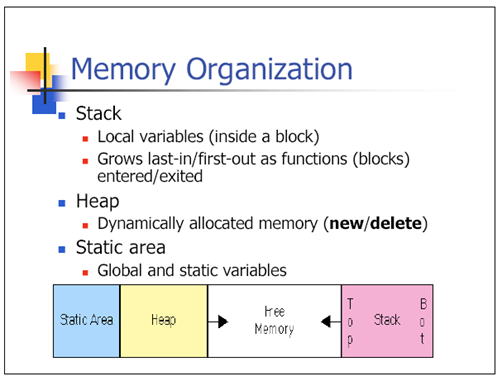
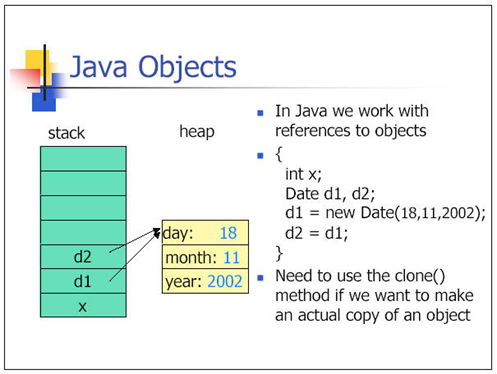
Primitives in Memory
- Primitives are allocated in stack if they are local methods variables.
- Primitives are allocated in heap if they are member variables of a class.
Thread
In a multi-threaded application each thread will have its own stack but will share the same heap. Stack is thread safe because each thread has its own stack but heap is not thread safe unless guarded with synchronization.
Ref: http://www.youtube.com/watch?v=VQ4eZw6eVtQ
Stack and Heap
http://www.wordesign.com/java/edp306704/session7.htm
Final, Finally(), Finalize()
- Final class cannot be extended or sub-classed.
- Final methods cannot be overridden when its class is inherited.
- Final variables’ value cannot be changed, it is a constant.
- Finally() is used in exception handling and will be executed whether or not exception is thrown e.g. close an opened connections is done in the finally method.
- Finalized() is called by GC before object is destroyed.
Override equals() and hashCode() of an Object
- Default behavior
- equals(): compare memory address of the object.
- hashCode(): returns a random integer that is unique for each instance. This integer might change between several executions of the application and won’t stay the same. hashCode() can also be the same for different object.
- If two objects are equal, they MUST have the same hash code.
- If two objects have the same hash code, it doesn’t mean that they are equal.
- Overriding equals() alone will make your business fail with hashing data structures like: HashSet, HashMap, HashTable … etc.
- In HashSet two equal object might exist since the hash code might be different. Same as in HashMap, where these equals object might exist in different bucket.
- Overriding hashcode() alone doesn’t force Java to ignore memory addresses when comparing two objects.
- In HashMap you might have different entries for “equal” object in the same bucket. See how HashMap works below.
- It is always recommended to override both to achieve proper functionality.
Primitives Hash Codes and Equals
- Need to be converted to primitives wrapper.
- Hash codes is always the value of the primitives itself. E.g. integer, long, char (hash code will the decimal value of the char). Similar to string, the hash codes is always the same no matter if different object for the same string is instantiated.
- Primitives with the same values are equals. Thus primitives can be safely use for has maps.
/**
 * Show hashcode() for primitives are always the value of the primitives.
 * Show equals() for primitives are always true for the same value.
 * Also include examples for String
 *
 */
public class HashCodeAndEqualsForPrimitives {
	public static void main (String [] argv){
		Integer int1=2;
		Integer int2=2;
		Util.println("int1 hash code: "+int1.hashCode());
		Util.println("int2 hash code: "+int2.hashCode());
		Util.println("Is int1 equals to int2? "+int1.equals(int2));

		Long long1=new Long(6);
		Long long2=new Long(6);
		Util.println("long1 hash code: "+long1.hashCode());
		Util.println("long2 hash code: "+long2.hashCode());
		Util.println("Is long1 equals to long2? "+long1.equals(long2));

		Character char1='a';
		Character char2='a';
		Util.println("char1 hash code: "+char1.hashCode());
		Util.println("char2 hash code: "+char2.hashCode());
		Util.println("Is char1 equals to char2? "+char1.equals(char2));

		String str1="abc";
		String str2="abc";
		Util.println("str1 hash code: "+str1.hashCode());
		Util.println("str22 hash code: "+str2.hashCode());
		Util.println("Is str1 equals to str2? "+str1.equals(str2));
	}
}


// Output
int1 hash code: 2
int2 hash code: 2
Is int1 equals to int2? true
long1 hash code: 6
long2 hash code: 6
Is long1 equals to long2? true
char1 hash code: 97
char2 hash code: 97
Is char1 equals to char2? true
str1 hash code: 96354
str22 hash code: 96354
Is str1 equals to str2? true
Collections (AKA Container)

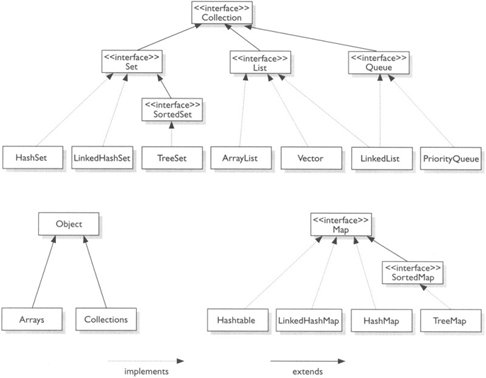
Collection — the root of the collection hierarchy. A collection represents a group of objects known as its elements.
Set — a collection that cannot contain duplicate elements.
List — an ordered collection (sometimes called a sequence). Lists can contain duplicate elements. The user of a List generally has precise control over where in the list each element is inserted and can access elements by their integer index (position).
Queue — a collection used to hold multiple elements prior to processing. Besides basic Collection operations, a Queue provides additional insertion, extraction, and inspection operations.
Queues typically, but do not necessarily, order elements in a FIFO (first-in, first-out) manner. Among the exceptions are priority queues, which order elements according to a supplied comparator or the elements’ natural ordering.
Map — an object that maps keys to values. Map is not collections and collections are not Map. A Map cannot contain duplicate keys; each key can map to at most one value. E.g. HashTable
Set implementations
- HashSet: Unique elements are not ordered.
- No duplicate “values”
- Purpose: to maintain a unique list.
- Determine equality based on hashCode() and equals() of the object.
- Example
HashSet<String> stateSet = new HashSet<String>();
stateSet.add ("CA");
stateSet.add ("WI");
stateSet.add ("NY");

if (stateSet.contains("PB")) /* if CA, it will not add but shows following message*/
   System.out.println("Already found");
else
   stateSet.add("PB");
- TreeSet: Unique elements are ordered ascending. Slowest performance.
- LinkedHashSet: Element are ordered as they are inserted.
List implementations
- ArrayList: Not synchronized but faster. Can expand automatically, access to any element O(1), insertions and deletions O(N), have methods for inserting, deleting and searching, can be traversed using foreach loop, iterators or indexes. Random access is fast. Adding/ deleting at start and middle of array will be slow b/c all later elements have to be copied forward or backward.
- Vectors: Similar to ArrayList but synchronized. Vector can hold objects but not primitive data types.
- LinkedList: Object/ Node are linked together. Faster for add/ delete anywhere in the middle, only need to update pointers. Random access is slow e.x. a.get(5) will need to walk forward from beginning or backward from end.
- PriorityQueue: is a data structure similar to Queue, but pulls/pops out the first element with top priority first (FPIFO, for convenience), whereas Queue is just ‘First In First Out’ (FIFO).
Map Implementation
Ref: http://www.pakzilla.com/2009/08/24/hashmap-vs-hashtable-vs-hashset/
Ref: http://hashfold.com/techfold/comparison-of-java-map-vs-hashmap-vs-hashtable-vs-hashset/
- Map: an interface, object that maps keys to values, cannot contains duplicate keys.
Map<String, Integer> m = new HashMap<String, Integer>();
- HashMap:
- Unsynchronized (not thread safe but better performance).
- Permits nulls (allow null values as key and value). Null key will always be stored in bucket 0.
- No order guarantee.
- Example:
HashMap<Integer,String> productMap = new HashMap<Integer,String>();
productMap.put(1, "Keys");
productMap.put(2, null);
How does HashMap works:
Put:
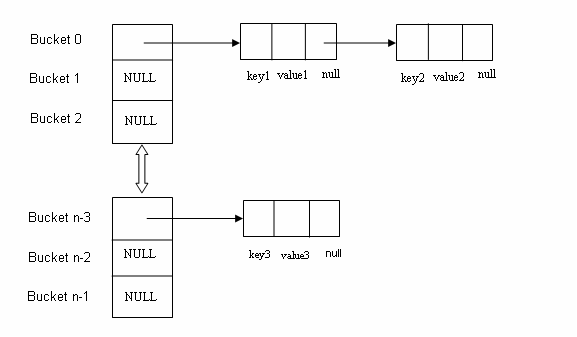
- Using hashCode() method, hash value will be calculated. Using that hash it will be ascertained, in which bucket particular entry will be stored.
- equals() method is used to find if such a key already exists in that bucket, if no then a new node is created with the map entry and stored within the same bucket. A linked-list is used to store those nodes.
- If equals() method returns true, which means that the key already exists in the bucket. In that case, the new value will overwrite the old value for the matched key.
Get:
As we already know how Entry objects are stored in a bucket and what happens in the case of Hash Collision it is easy to understand what happens when key object is passed in the get method of the HashMap to retrieve a value.
Using the key again hash value will be calculated to determine the bucket where that Entry object is stored, in case there are more than one Entry object with in the same bucket stored as a linked-list equals() method will be used to find out the correct key. As soon as the matching key is found get() method will return the value object stored in the Entry object.
Null Key:
As we know that HashMap also allows null, though there can only be one null key in HashMap. While storing the Entry object HashMap implementation checks if the key is null, in case key is null, it always map to bucket 0 as hash is not calculated for null keys.
- HashTable:
- No null as key and value.
- Synchronized (thread safe at performance cost).
- Example:
Hashtable<Integer,String> cityTable = new Hashtable<Integer,String>();
cityTable.put(1, "New York");
cityTable.put(2, "San Franscisco");
cityTable.put(3, null); /* NullPointerEcxeption at runtime*/

System.out.println(cityTable.get(1));
System.out.println(cityTable.get(2));
System.out.println(cityTable.get(3));- TreeMap. Keys are sorted in ascending order
- Linked HashMap. Maintain order of the element added.
Ref: http://www.interview-questions-java.com/java-collections.htm
http://linux4genext.blogspot.com/2011/07/collections-in-java.html
Checked Collections
In Java, generics helps to avoid insertion of wrong type at compile time. But generics do not guarantee correct object type insertion at run time. Checked collections come to the rescue to enforce restrictions on type inserted to a collection. E.g. Collections.checkedCollection, Collections.checkedList, Collections.checkedMap, Collections.checkedSet etc.
/**
 * Shows how Collections.Checked*() enforce restriction to have correct object type added to
 * a collection. Any attempt to insert an element of the wrong type will result in an
 * immediate ClassCastException.
 */
public class CheckedCollections {
	public static void main(String [] argv){
		// Normally we do
		List<Integer> num=new ArrayList<>();
		num.add(1);
		num.add(2);
		// num.add("a"); // If you try to add this compiler will complaint.

		// However try this
		List numRaw=new ArrayList(); // Compiler will throw raw type warning, but sometimes this is ignored
		numRaw.add(1);	// Compiler raw type warning but insertion is successful.
		numRaw.add(2);    // Compiler raw type warning but insertion is successful.
		numRaw.add("a");  // Compiler raw type warning, insertion is successful
		                // but this is totally different type than we expect.
		Util.println(Arrays.toString(numRaw.toArray()));

		// Checked collection
		Collection chkNum=Collections.checkedCollection(num, Integer.class);
		chkNum.add(10); // 10 will be added successfully
		Util.println(Arrays.toString(chkNum.toArray()));

		chkNum.add("a"); // Class cast exception is thrown
	}
}


// Output
[1, 2, a]
[1, 2, 10]
Exception in thread "main" java.lang.ClassCastException: Attempt to insert class java.lang.String element into collection with element type class java.lang.Integer
	at java.util.Collections$CheckedCollection.typeCheck(Collections.java:3037)
	at java.util.Collections$CheckedCollection.add(Collections.java:3080)
	at com.pifl.exercise.sandbox.CheckedCollections.main(CheckedCollections.java:35)
Thread safe Collections
A few ways to achieve:
- Concurrent Collections (java.util.concurrent) (Java 5)
- ConcurrentHashMap – recommend to use this.
- Variant of HashTable.
- Do not allow null keys or values.
- More optimized than HashTable since it does not lock the whole map. Retrieval operations do not entail locking.
- Write/ update will only lock certain segment (bucket).
- Write/ update to the same bucket will have to wait until the first one is done.
- Read to the same bucket while it is being updated will not be locked, read will retrieve the previous values.
- Read to other buckets are not locked.
- From JavaDoc: “Retrieval operations (including get) generally do not block, so may overlap with update operations (including put and remove). Retrievals reflect the results of the most recently completed update operations holding upon their onset”
- In case of multiple readers and single write this is the best choice.
- Faster than synchronizedMap (see below).
- Blocking queue. Defines a first-in-first-out data structure. It will block when Producer attempts to add to a full queue and blocks when Consumer retrieves from an empty queue (waiting for queue to be filled up by producer).
- Use this to implement producer-consumer design pattern.
- Implementations:
- ArrayBlockingQueue.
BlockingQueue queue = new ArrayBlockingQueue(1024); has to be bounded. - DelayQueue.
- LinkedBlockingQueue.
BlockingQueue<String> unbounded = new LinkedBlockingQueue<String>();
BlockingQueue<String> bounded = new LinkedBlockingQueue<String>(1024);
- ArrayBlockingQueue.
- ConcurrentHashMap – recommend to use this.
- CopyOnWriteArrayList (Java 5):
- Thread safe variant of ArrayList which all mutative operations (add, set, and so on) are implemented by making a fresh copy of the underlying array.
- Iterator does not support remove operation. Exception Unsupported Operation will be thrown.
- Costlier than ArrayList with its mutative operation but more efficient when traversal operations outnumber mutation.
- CopyOnWriteArraySet(Java 5):
- Implements Collection and Set interface.
- Not sorted.
- Use some functionalities of CopyOnWriteArrayList for its operations (composition?).
- Same behaviour as CopyOnWriteArrayList mentioned above.
- ConcurrentSkipListSet and ConcurrentSkipListMap
Set: Constructs a new, empty set that orders its elements according to their natural ordering.
TODO: need more explanation. - Synchronized wrapper classes: Collections.synchronizedMap and Collections.synchronizedList. These are used to convert HashMap and ArrayList to thread-safe class. This acts like thread safe wrapper class. Slower than ConcurrentHashMap since it locks the entire collections.public static Collection synchronizedCollection(Collection c);
public static Set synchronizedSet(Set s);
public static List synchronizedList(List list);
public static Map synchronizedMap(Map m);
public static SortedSet synchronizedSortedSet(SortedSet s);
public static SortedMap synchronizedSortedMap(SortedMap m);Note: Need to synchronized on the returned synchronized collection when iterating on it.Collection<Type> c = Collections.synchronizedCollection(myCollection);
synchronized(c) {
for (Type e : c)
foo(e);
}Map<KeyType, ValType> m = Collections.synchronizedMap(new HashMap<KeyType, ValType>());
...
Set<KeyType> s = m.keySet();
...
// Synchronizing on m, not s!
synchronized(m) {
while (KeyType k : s)
foo(k);
}
// Or
Map m = Collections.synchronizedMap(new HashMap());
...
Set s = m.keySet(); // Needn't be in synchronized block
...
synchronized(m) { // Synchronizing on m, not s!
Iterator i = s.iterator(); // Must be in synchronized block
while (i.hasNext())
foo(i.next());
}Map<String,String> map = new HashMap<String,String>();
// populate the map
map.put("1","TP");
map.put("2","IS");
map.put("3","BEST");
// create a synchronized map
Map<String,String> synmap = Collections.synchronizedMap(map); - Unmodifiable Wrappers
The unmodifiable wrappers have two main uses:- To make a collection immutable once it has been built. In this case, it’s good practice not to maintain a reference to the backing collection. This absolutely guarantees immutability.
- To allow “second-class citizens” read-only access to your data structures. You keep a reference to the backing collection, but hand out a reference to the wrapper. In this way, the second-class citizens can look but not touch, while you maintain full access.public static Collection unmodifiableCollection(Collection c);
public static Set unmodifiableSet(Set s);
public static List unmodifiableList(List list);
public static Map unmodifiableMap(Map m);
public static SortedSet unmodifiableSortedSet(SortedSet s);
public static SortedMap unmodifiableSortedMap(SortedMap m);
- Synchronized collections: Hashtable (Java 1) and Vector (Java 1).
Iterator, ListIterator, Foreach (For Each)
Iterator: Iterate collection forward. Used in Map, List, Set implementation.
ArrayList al=new ArrayList();
al.add("C");
al.add("A");
al.add("E");

// use iterator to display contents of al
System.out.print("Original contents of al: ");
Iterator itr = al.iterator();
while(itr.hasNext()) {
    Object element = itr.next();
    System.out.print(element + " ");
}
For HashMap:
Map<String, Integer> mp=new HashMap<String, Integer>();

mp.put("bob",1); // add more items

Iterator<Integer> it=mp.values().iterator();

// Or can be used with key

Iterator<Integer> it=mp.keySet().iterator();
ListIterator: Access collection back and forward.
Used only with List object.
public class MyListIterator {
    public static void main(String a[]){
        List<Integer> li = new ArrayList<Integer>();
        ListIterator<Integer> litr = null;
        li.add(23);
        li.add(98);
        li.add(29);
        li.add(71);
        li.add(5);
        litr=li.listIterator();
        System.out.println("Elements in forward directiton");
        while(litr.hasNext()){
            System.out.println(litr.next());
        }
        System.out.println("Elements in backward directiton");
        while(litr.hasPrevious()){
            System.out.println(litr.previous());
        }
    }
}

// Output
Elements in forward directiton
23
98
29
71
5
Elements in backward directiton
5
71
29
98
23
Methods of ListIterator
1) void add(E e): Inserts the specified element into the list (optional operation).
2) boolean hasNext(): Returns true if this list iterator has more elements when traversing the list in the forward direction.
3) boolean hasPrevious(): Returns true if this list iterator has more elements when traversing the list in the reverse direction.
4) E next(): Returns the next element in the list and advances the cursor position.
5) int nextIndex(): Returns the index of the element that would be returned by a subsequent call to next().
6) E previous(): Returns the previous element in the list and moves the cursor position backwards.
7) int previousIndex(): Returns the index of the element that would be returned by a subsequent call to previous().
8) void remove(): Removes from the list the last element that was returned by next() or previous() (optional operation).
9) void set(E e): Replaces the last element returned by next() or previous() with the specified element (optional operation).
Foreach (Java 1.5): Makes code look better, easier to read.
for (Iterator i = suits.iterator(); i.hasNext(); ) {
    Suit suit = (Suit) i.next();
    for (Iterator j = ranks.iterator(); j.hasNext(); )
        sortedDeck.add(new Card(suit, j.next()));
}

Vs.

for (Suit suit : suits)
    for (Rank rank : ranks)
        sortedDeck.add(new Card(suit, rank));
Fail Fast vs Fail Safe Iterator
Fail Fast
Fail-fast iterator can throw ConcurrentModificationException in two scenarios :
Single Threaded Environment
After the creation of the iterator , structure is modified at any time by any method other than iterator’s own remove method.
Multiple Threaded Environment
If one thread is modifying the structure of the collection while other thread is iterating over it .
Fail-Safe
Fail Safe Iterator makes copy of the internal data structure (object array) and iterates over the copied data structure.Any structural modification done to the iterator affects the copied data structure. So , original data structure remains structurally unchanged .Hence , no ConcurrentModificationException throws by the fail safe iterator.
Two issues associated with Fail Safe Iterator are :
- Overhead of maintaining the copied data structure i.e memory.
- Fail safe iterator does not guarantee that the data being read is the data currently in the original data structure.
| Fail Fast Iterator | Fail Safe Iterator | |
|---|---|---|
| Throw ConcurrentModification Exception | Yes | No |
| Clone object | No | Yes |
| Memory Overhead | No | Yes |
| Examples | HashMap,Vector,ArrayList,HashSet | CopyOnWriteArrayList, ConcurrentHashMap |
Fail-fast example: Using HashMap. For each looping will be fail-fast as well.
public class FailFastExample{
    public static void main(String[] args){
        Map<String,String> premiumPhone = new HashMap<String,String>();
        premiumPhone.put("Apple", "iPhone");
        premiumPhone.put("HTC", "HTC one");
        premiumPhone.put("Samsung","S5");

        Iterator iterator = premiumPhone.keySet().iterator();

        while (iterator.hasNext()){
            System.out.println(premiumPhone.get(iterator.next()));
            premiumPhone.put("Sony", "Xperia Z");
        }
    }
}

// Output
iPhone
Exception in thread "main" java.util.ConcurrentModificationException
 at java.util.HashMap$HashIterator.nextEntry(Unknown Source)
 at java.util.HashMap$KeyIterator.next(Unknown Source)
 at FailFastExample.main(FailFastExample.java:20)
Fail-Safe Example: Using ConccurentHashMap. For each looping in here will be fail-safe as well.
public class FailSafeExample{
    public static void main(String[] args){
        ConcurrentHashMap<String,String> premiumPhone =
                               new ConcurrentHashMap<String,String>();
        premiumPhone.put("Apple", "iPhone");
        premiumPhone.put("HTC", "HTC one");
        premiumPhone.put("Samsung","S5");

        Iterator iterator = premiumPhone.keySet().iterator();

        while (iterator.hasNext()){
            System.out.println(premiumPhone.get(iterator.next()));
            premiumPhone.put("Sony", "Xperia Z");
        }
    }
}

// Output
S5
HTC one
iPhone
Exception Handling
Good reference: http://tutorials.jenkov.com/java-exception-handling/index.html
Exception
Checked
The exceptions that are checked at compile time. If some code within a method throws a checked exception, then the method must either handle the exception or it must specify the exception using throws keyword.
For example, consider the following Java program that opens file at locatiobn “C:\test\a.txt” and prints first three lines of it. The program doesn’t compile, because the function main() uses FileReader() and FileReader() throws a checked exception FileNotFoundException. It also uses readLine() and close() methods, and these methods also throw checked exception IOException
import java.io.*;
 class Main {
    public static void main(String[] args) {
        FileReader file = new FileReader("C:\\test\\a.txt");
        BufferedReader fileInput = new BufferedReader(file);

        // Print first 3 lines of file "C:\test\a.txt"
        for (int counter = 0; counter < 3; counter++)
            System.out.println(fileInput.readLine());

        fileInput.close();
    }
}
Unchecked
The exceptions that are not checked at compiled time. In C++, all exceptions are unchecked, so it is not forced by the compiler to either handle or specify the exception. It is up to the programmers to be civilized, and specify or catch the exceptions.
In Java exceptions under Error and RuntimeException classes are unchecked exceptions, everything else under throwable is checked.
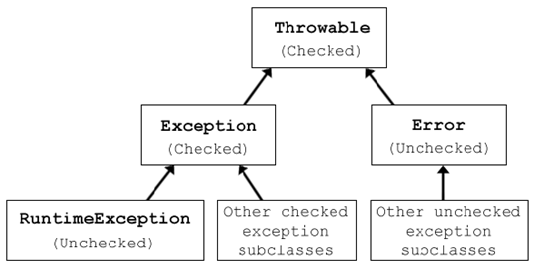
java.lang.Object
  +--java.lang.Throwable (CHECKED)
    +--Exception (CHECKED)
    |     +--ClassNotFoundException
    |     +--IOException
    |     |     +--FileNotFoundException
    |     +--SQLException
    |     +--MalformedURLException
    |     +--RuntimeException (UNCHECKED)
    |     |     +--NullPointerException
    |     |     +--NumberFormatException
    |     |     +--ClassCastException
    |     |     +--IndexOutOfBoundsException
    |     |     |    +--ArrayIndexOutOfBoundsException
    +--Error (UNCHECKED)
    |     +--VirtualMachineError
    |     |     +--OutOfMemoryError
Ref: http://www.geeksforgeeks.org/checked-vs-unchecked-exceptions-in-java/
Error Vs Exception
- Error is not meant to be caught. It represent a fatal issue with the system. E.g. Out of Memory Error. On the other hand Exception can be caught and program can recover.
- Exception is subdivided into 2: checked and unchecked while Error is not.
- Error is unchecked.
Finally will always be executed
- Finally block will always be executed no matter what.
- If a try or catch block has a return statement, finally will be call before returning to the caller. However, the return value will not be changed even when the value is changes in the finally.
- If catch does not get executed. The finally will change the return value.
public class TryCatchFinally {
 public int returnInCatch(){
 System.out.println("---- Return in Catch block");
 int i=1;
 try{
 throw new Exception("Bla");
 }catch(Exception e){
 return i;
 }finally{
 i=20;
 System.out.println("Finally is called. i is reassign to: "+i);
 }
 }

 public int returnNoCatch(){
 System.out.println("----- Return no catch");
 int i=1;
 try{
 System.out.println("In try");
 }catch(Exception e){
 return i;
 }finally{
 i=20;
 System.out.println("Finally is called. i is reassign to: "+i);
 }

 return i;
 }

 public static void main(String[] args) {
 TryCatchFinally obj=new TryCatchFinally();
 System.out.println("Return is: "+obj.returnInCatch());
 System.out.println("Return is:"+obj.returnNoCatch());
 }
}

// Output will be
---- Return in Catch block
Finally is called. i is reassign to: 20
Return is: 1
----- Return no catch
In try
Finally is called. i is reassign to: 20
Return is:20 - Next
Try With Resource (Java 7)
Allow resources to be created and closed automatically.
Pre Java 7:
try{
  //open file or resources
}catch(IOException){
  //handle exception
}finally{
  //close file or resources
}
Java 7:
try(open file or resource here){
 //...
}catch(...){
 //...
}
//after try block, file will close automatically.
Example Java 6: Classic way to read a file.
import java.io.BufferedReader;
import java.io.FileReader;
import java.io.IOException;

public class Example1 {
	public static void main(String[] args) {
		BufferedReader br = null;
		try {
			String line;
			br = new BufferedReader(new FileReader("C:\\testing.txt"));
			while ((line = br.readLine()) != null) {
                System.out.println(line);
			}
		} catch (IOException e) {
			e.printStackTrace();
		} finally {
			try {
				if (br != null)br.close();
			} catch (IOException ex) {
				ex.printStackTrace();
			}
		}
	}
}
Example Java 7: finally is no longer required. The file will be closed automatically after try block.
import java.io.BufferedReader;
import java.io.FileReader;
import java.io.IOException;

public class Example2 {

	public static void main(String[] args) {
		try (BufferedReader br = new BufferedReader(new FileReader("C:\\testing.txt")))
		{
			String line;
			while ((line = br.readLine()) != null) {
                System.out.println(line);
			}
		} catch (IOException e) {
			e.printStackTrace();
		}
	}
}
Example 2 Java 7: with 2 open resources
private static void printFileJava7() throws IOException {
    try(  FileInputStream     input         = new FileInputStream("file.txt");
          BufferedInputStream bufferedInput = new BufferedInputStream(input)) {
        int data = bufferedInput.read();
        while(data != -1){
            System.out.print((char) data);
            data = bufferedInput.read();
        }
    }
}
This is also beneficial for implementing fail-safe exception handling easier. See Jenkov statement and links:
” If an exception is thrown both from inside the try-with-resources block, and when the FileInputStream is closed (when close() is called), the exception thrown inside the try block is thrown to the outside world. The exception thrown when the FileInputStream was closed is suppressed. This is opposite of what happens in the example first in this text, using the old style exception handling (closing the resources in the finally block). “
Multiple resources can also be called within the try.
http://tutorials.jenkov.com/java-exception-handling/try-with-resources.html
equals() vs. ==
For primitives, == is used to compare the “values”.
For objects, by default both equlas() and ” == ” are the same, they checks to see if both objects reference the same place in memory. One has to overwrite equals() in order to compare actual values for objects.
public class EqualsAndEquals {
	public static void main(String []arg) {
		EqualsAndEquals obj1=new EqualsAndEquals();
		EqualsAndEquals obj2=new EqualsAndEquals();

		System.out.println("obj1==obj1: "+(obj1==obj1));
		System.out.println("obj1==obj2: "+(obj1==obj2));
		System.out.println("obj2.equals(obj2): "+obj2.equals(obj2));
		System.out.println("obj1.equals(obj2): "+obj1.equals(obj2));
	}
}

// Output are
obj1==obj1: true
obj1==obj2: false
obj2.equals(obj2): true
obj1.equals(obj2): false
String object is special, see String Literals vs. Object.
String Literal vs. Object
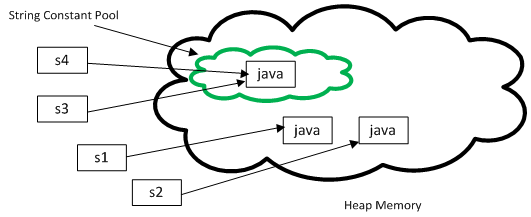
String strLiteral = “Java”;
String strObject = new String(“Java”);
Both expression gives you String object. When you create String object using new() operator, it always create a new object in heap memory. On the other hand, if you create object using String literal syntax e.g. “Java”, it may return an existing object from String pool (a cache of String object in Perm gen space, which is now moved to heap space in Java 7), if it’s already exists. Otherwise it will create a new string object and put in string pool for future re-use.
Can use ‘==’ to compare String literals, but cannot compare String object with it since it will compare the address.
String a = "Java";
String b = "Java";
System.out.println(a == b); // True

String e = "JDK";
String f = new String("JDK");
System.out.println(e == f); // False since it will try to equate value in 'e' with address of 'f'

String e=new String("JDK");
String f=new String("JDK");
System.out.println(e==f); // False
System.out.println(e.equals(f)) // True
String Intern() method
Will be used in conjunction of New String(“hello”) for example. This will return string from String Pool if it is already there, if it is not then it will create “hello” and put is in String Pool.
public class InternExample{
   public static void main(String args[]){
      String s1=new String("hello");
      String s2="hello";
      String s3=s1.intern();//returns string from pool, now it will be same as s2
      System.out.println(s1==s2);//false because reference is different
      System.out.println(s2==s3);//true because reference is same
}}
Note: Strings that are in String Pool will not be garbage collected. (Need more investigation on this statement).
Auto-boxing and Un-boxing
Autoboxing: automatic conversion from primitive to object wrapper e.g. int -> Integer
The compiler will use Integer.valueOf(int) to convert int to Integer at run time.
Unboxing: automatic conversion from object wrapper to primitive e.g. Integer -> int.
The compiler does not generate an error because it invokes the intValue() method to convert an Integer to an int at runtime.
Autoboxing and unboxing lets developers write cleaner code, making it easier to read.
| Primitive type | Wrapper class |
|---|---|
| boolean | Boolean |
| byte | Byte |
| char | Character |
| float | Float |
| int | Integer |
| long | Long |
| short | Short |
| double | Double |
Ref: https://docs.oracle.com/javase/tutorial/java/data/autoboxing.html
MySQL
Basic Queries
Create table
CREATE TABLE products
(
id INT NOT NULL AUTO_INCREMENT PRIMARY KEY,
name varchar(30),
price float,
quantity int
);
Explanation
- id INT NOT NULL AUTO_INCREMENT:
- INT – type of int, NOT NULL – this column cannot be null,
- AUTO_INCREMENT – each time a new entry is added the value is incremented by 1.
- PRIMARY KEY(product_id): product_id is made as Primary Key as unique identifier for the row.
- name VARCHAR(30):
Create a column “name” with type character (letters, numbers, symbols etc.) with variable length between 0 to 30. - price FLOAT: ???
- quantity INT:
Create a column “quantity” with type integer with possible value of -2,147,483,648 to 2,147,483,647.
CREATE TABLE reviews
(
id INT NOT NULL AUTO_INCREMENT PRIMARY KEY,
rating TINYINT,
review TEXT,
product_id INT,
FOREIGN KEY (product_id) REFERENCES products(id)
ON DELETE CASCADE
ON UPDATE CASCADE
);
Explanation:
product_id INT: Foreign key from products.
Insert
INSERT INTO products (name, price) VALUES('Tape Gun', 14.50 )
/* OR can be written as */
INSERT INTO products VALUES(‘Tape Gun’, 14.50)
Select
SELECT products.name, reviews.review FROM products, reviews
WHERE products.product_id=reviews.product_id
AND products.name LIKE “Tape%”
Update
UPDATE products SET price=15.50, quantity=10 WHERE name=’Tape Gun’
Delete
DELETE FROM products, reviews
WHERE products.product_id = reviews.product_id
AND product_id=1
Case Sensitive Query
/* Using binary */
SELECT * FROM TestCustomerName WHERE BINARY name='Ferry'

/* Use upper and lower case */
SELECT * FROM TestCustomerName WHERE upper(name)='FERRY'
Ref: http://www.tizag.com/mysqlTutorial/mysqlquery.php
Join
For the most part only use JOIN, INNER JOIN, LEFT JOIN, RIGHT JOIN. JOIN = INNER JOIN = using where. OUTER might be added after the word LEFT/ RIGHT ex. LEFT OUTER JOIN, but not necessary, essentially this equals to LEFT JOIN. They are for ODBC compatibility and do not add extra capabilities.
JOIN: only includes all records that match.
SELECT name, phone, selling
FROM demo_people JOIN demo_property
ON demo_people.pid = demo_property.pid;
LEFT JOIN: includes all records that match plus unmatched records on the left.
SELECT name, phone, selling
FROM demo_people LEFT JOIN demo_property
ON demo_people.pid = demo_property.pid;
RIGHT JOIN: includes all records that match plus unmatched records on the right.
SELECT name, phone, selling
FROM demo_people RIGHT JOIN demo_property
on demo_people.pid = demo_property.pid;

Ref: http://www.wellho.net/mouth/158_MySQL-LEFT-JOIN-and-RIGHT-JOIN-INNER-JOIN-and-OUTER-JOIN.html
Group By
The SQL GROUP BY clause can be used in a SELECT statement to collect data across multiple records and group the results by one or more columns.
SELECT expression1, expression2, … expression_n,
aggregate_function (expression)
FROM tables
WHERE conditions
GROUP BY expression1, expression2, … expression_n;
Parameters or Arguments
- expression1, expression2, … expression_n are expressions that are not encapsulated within an aggregate function and must be included in the GROUP BY Clause.
- aggregate_function can be a function such as SUM, COUNT, MIN, MAX, or AVG functions.
- tables are the tables that you wish to retrieve records from. There must be at least one table listed in the FROM clause.
- conditions are conditions that must be met for the records to be selected.
Example – Using GROUP BY with the SUM Function:
| employee_number | last_name | first_name | salary | dept_id |
|---|---|---|---|---|
| 1001 | Smith | John | 62000 | 500 |
| 1002 | Anderson | Jane | 57500 | 500 |
| 1003 | Everest | Brad | 71000 | 501 |
| 1004 | Horvath | Jack | 42000 | 501 |
SELECT dept_id, SUM(salary) AS total_salaries
FROM employees
GROUP BY dept_id;
| dept_id | total_salaries |
|---|---|
| 500 | 119500 |
| 501 | 113000 |
Example – Using GROUP BY with the MIN function:
SELECT dept_id, MIN(salary) AS lowest_salary
FROM employees
GROUP BY dept_id;
| dept_id | lowest_salary |
|---|---|
| 500 | 57500 |
| 501 | 42000 |
Example – Using GROUP BY with the MAX function:
SELECT dept_id, MAX(salary) AS highest_salary
FROM employees
GROUP BY dept_id;
| dept_id | highest_salary |
|---|---|
| 500 | 62000 |
| 501 | 71000 |
Example – Using GROUP BY with the COUNT function:
| product_id | product_name | category_id |
|---|---|---|
| 1 | Pear | 50 |
| 2 | Banana | 50 |
| 3 | Orange | 50 |
| 4 | Apple | 50 |
| 5 | Bread | 75 |
| 6 | Sliced Ham | 25 |
| 7 | Kleenex | NULL |
SELECT category_id, COUNT(*) AS total_products
FROM products
WHERE category_id IS NOT NULL
GROUP BY category_id
ORDER BY category_id;
| category_id | total_products |
|---|---|
| 25 | 1 |
| 50 | 4 |
| 75 | 1 |
Ref: http://www.techonthenet.com/sql/group_by.php
Having
The HAVING clause was added to SQL because the WHERE keyword could not be used with aggregate functions.
SELECT DeptID, SUM(SaleAmount)
FROM Sales
WHERE SaleDate = ’01-Jan-2000′
GROUP BY DeptID
HAVING SUM(SaleAmount) > 1000
SELECT DepartmentName, COUNT(*)
FROM Employee, Department
WHERE Employee.DepartmentID = Department.DepartmentID
GROUP BY DepartmentName
HAVING COUNT(*)>1;
HAVING is convenient, but not necessary. Code equivalent to the example above, but without using HAVING, might look like:
SELECT * FROM (
SELECT DepartmentName AS deptNam, COUNT(*) AS empCnt
FROM Employee AS emp, Department AS dept
WHERE emp.DepartmentID = dept.DepartmentID
GROUP BY deptNam
) AS grp
WHERE grp.empCnt > 1;
SQL Optimization
- Use Index
Index the column to optimize search results. However index is good for table that is used for a lot of reading. Index will slow an updating. See more index discussion in next section below. - Use the actual columns names instead of ‘*’
Use:
SELECT id, first_name, last_name, age, subject FROM student_details;Instead of:
SELECT * FROM student_details; - Minimize sub queries. (Or use join instead of sub queries – need to find example)
Use:
SELECT name
FROM employee
WHERE (salary, age ) = (SELECT MAX (salary), MAX (age)
FROM employee_details)
AND dept = ‘Electronics’;Instead of:
SELECT name
FROM employee
WHERE salary = (SELECT MAX(salary) FROM employee_details)
AND age = (SELECT MAX(age) FROM employee_details)
AND emp_dept = ‘Electronics’; - Avoid NOT operator. It is much faster to search using positive operator such as LIKE, IN, EXIST or ‘=’ instead of using negative operator such as NOT LIKE, NOT IN, NOT EXIST or !=.Negative operator will cause the search to find every single row to identify that they are ALL not belong or exist within the table. On the other hand, using a positive operator just stop immediately once the result has been found.
- Limit the result. In case of millions of records this will break the DB with simple query like this:
SELECT * FROM table_name
Instead use the following:
SELECT * FROM table_name LIMIT 10 // MySQL syntax
SELECT * FROM table_name WHERE ROWNUM <=10 // Oracle syntaxThis will also minimize the damage on SQL injection attack. - Next
Ref:
http://hungred.com/useful-information/ways-optimize-sql-queries/
http://beginner-sql-tutorial.com/sql-query-tuning.htm
Database
Troubleshooting when hang
http://www.oracle.com/technetwork/issue-archive/2012/12-jul/o42dba-1566567.html
Index
An index can be created in a table to find data more quickly and efficiently. A good analogy for this is an index in a book for example to search for Golden Retriever, you can go to the index and it will tell you the page number rather than flipping through all the pages.
As book index contains page number, a database index contains a pointer to the row containing the value that you are searching for in your SQL.


Ref: http://dba.fyicenter.com/faq/sql_server/table_index_diagram.jpg
The users cannot see the indexes, they are just used to speed up searches/queries. Index should only be created on a table if the data in the indexed column will be queried frequently.
Note: Updating a table with indexes takes more time than updating a table without (because the indexes also need an update). So you should only create indexes on columns (and tables) that will be frequently searched against.
Syntax:
CREATE INDEX index_name
ON table_name (column_name1, column_name2...)
Types of index:
- Single column index.
CREATE INDEX index_name
ON table_name (column_name); - Composite column index, index on two or more column.
CREATE INDEX index_name
on table_name (column1, column2); - Unique index: does not allow any duplicates values to be inserted. It is used for performance and data integrity.
CREATE INDEX index_name
on table_name (column1, column2); - Implicit index: automatically creates e.g. primary key constrain and unique constraint.
When to avoid index:
- Indexes should not be used on small tables.
- Tables that have frequent, large batch update or insert operations.
- Indexes should not be used on columns that contain a high number of NULL values.
- Columns that are frequently manipulated should not be indexed.
XML
XML Interview Questions:
http://www.developersbook.com/xml/interview-questions/xml-interview-questions-faqs-1.php
DTD: Document Declaration Type, not as good as XSD.
Tutorial by example XSD (XML Schema Definition):
http://www.codeguru.com/java/article.php/c13529/XSD-Tutorial-XML-Schemas-For-Beginners.htm#page-1
Spring Framework Overview
Advantage of spring:
- Basic version is 2 MB.
- IOC – Inversion of Control AKA Dependency Injection (DI). Loose coupling. IOC container responsible for creating, managing, wiring and configuring the object as well as manage life cycle.
- Spring contains and manages life cycle and configuration of application objects.
Below are classes for spring example
package com.pifl;
public class Car{
   private String brand;
   private String color;

   public void setBrand(String brand){
      this.brand=brand;
   }
   public String getBrand(){
      return brand;
   }
   public void setColor(String color){
      this.color=color;
   }
   Public String getColor(){
      Return color;
   }
}

public class User {
    private String name;
    private int age;
    private String country;
    private Car car;

    User(String name, int age, String country)  {
        this.name=name;
        this.age=age;
        this.country=country;
    }

    User( int age, String country){
       this.age=age;
       this.country=country;
    }
    public String toString() {
       return name + " is " + age
                               + " years old, living in "
                               + country;
    }
    public String getName() {
    	return name;
    }
    public void setName(String name) {
    	this.name = name;
    }
    public int getAge() {
    	return age;
    }
    public void setAge(int age) {
    	this.age = age;
    }
    public String getCountry() {
    	return country;
    }
    public void setCountry(String country) {
    	this.country = country;
    }
}

// MAIN
package com.pifl;
import org.springframework.context.ApplicationContext;
import org.springframework.context.support.ClassPathXmlApplicationContext;

public class main {
    public static void main(String[] args) {
        ApplicationContext context = new
        ClassPathXmlApplicationContext("beans.xml");
        User user = (User)context.getBean("user");
        System.out.println(user);
    }
}
Bean Scopes
Singleton (by default) – Should be used for stateless bean.
Prototype – new bean instance is created every time a request for that specific bean is made. Should be used for statefull bean.
Configuring Beans Properties
2 Types. Rule of thumb: use constructor arguments for mandatory dependencies and setters for optional dependencies. It is true that setters is most often used.
Ref:
http://www.tutorialspoint.com/spring/spring_dependency_injection.htm
http://java.dzone.com/articles/dependency-injection-an-introd?page=0,0
http://www.dzone.com/tutorials/java/spring/spring-bean-setter-injection-1.html
Constructor Injection.
Set bean property via constructor injection.
If there are two constructors, to differentiate between the two, “type” and “index” (to specify order) attribute must be defined in the xml.
<beans>
    <bean id="user" class="com.pifl.User" >
        <constructor-arg index="0" type="java.lang.String" value="Eswar" />
        <constructor-arg index="1" type="int" value="24"/>
        <constructor-arg index="2" type="java.lang.String" value="India"/>
    </bean>
    <bean id="userWithTwoParams" class="com.pifl.User" >
       <constructor-arg index="0" type="int" value="24"/>
       <constructor-arg index="1" type="java.lang.String" value="India"/>
   </bean>
</beans>
Setter Injection.
Set bean property via setter injection with dependency injection. Commonly used.
<beans >
   <bean id=”userCar” class=”com.pifl.Car” />

   <bean id="user" class="com.pifl.User" >
        <property name="name" value="Eswar" />
        <property name="age" value="24"/>
        <property name="country" value="India"/>
        <property name=”car” ref=”userCar”>
    </bean>
</beans>
Graphical View Setter Dependency Injection

Factory Methods
Instantiate object via spring where object cannot be instantiated directly using its constructor i.e. object has private constructor.
http://www.javabeat.net/create-spring-beans-using-factory-methods/
Static Factory
We can use the ‘factory-method’ attribute to tell spring to call a static factory method to instantiate our bean. Useful when existing legacy codes use static (factory) methods to create objects.
package com.pifl
public interface JapaneseCar{
}
public class Honda implements JapaneseCar{
   public String color;
   // Getter and setter below
   …
}

public class Toyota implements JapaneseCar{
   public String color;
   // Getter and setter below
   …
}

// Car factory with private constructor and static method to get instance.
public class CarFactory{
   public Integer factoryMaxOutput;
   private CarFactory(){};

   // Static factory methods
   public static JapaneseCar createJapaneseCarByBrand(String brand){
      if(brand.equals(”Honda”))
         return new Honda();
     else
        return new Toyota();
   }
   // Getter and setter below
   …
}

<bean id="honda" class="com.pifl.CarFactory"
    factory-method="createJapaneseCarByBrand">
    <constructor-arg value="Honda"/>
    <property name="color" value="Black"/>
</bean>
The constructor arguments will be passed as parameters to the static factory method and the property elements “color” will be set on the honda bean.
Instance Factory
We can use the ‘factory-bean’ attribute along with the ‘factory-method’ attribute to call instance factory methods to create our beans. Let’s say the CarFactory class now looks like below:
// Car factory with private constructor and static method to get instance.
public class CarFactory{
   public Integer factoryMaxOutput;

   private CarFactory(){};

   // Static factory methods
   public static JapaneseCar getInstance(){
      return new CarFactory()
   }

   public JapaneseCar getHonda(){
      return new Honda();
   }
   // Getter and setter below
   …
}

<bean id="japaneseCarFactory"
   class="com.pifl.CarFactory">
   factory-method=”getInstance”/>
</bean>

<bean id="honda" factory-bean="japaneseCarFactory"
                              factory-method="getHonda">
    <constructor-arg value="1"/>
    <property name="color" value="Silver"/>
</bean>
Ref: http://www.programmingforliving.com/2012/09/spring-bean-instantiation-through_27.html
Factory Bean
Use spring’s own FactoryBean interface to create your factory class. This will make your code tightly coupled with Spring. One example is when you have a class you want to use but it has private constructor and only static method to give an object, see CarFactory class with static method createJapaneseCarByBrand. We can create a wrapper class which implements FactoryBean and have a public constructor.
// Wrapper class for CarFactory to create Japanese car
public class CarFactoryWrapper implements FactoryBean<JapaneseCar>{
private JapaneseCar car=null;
private String brand;
public CarFactoryWrapper(String brand){
car=CarFactory.createJapaneseCarByBrand(brand);
}
// Implements Factory Bean methods
public JapaneseCar getObject() throws Exception{
return car;
}
public Class<JapaneseCar> getObjectType(){
return JapaneseCar.class;
}
public Boolean isSingleton(){
return true;
}
}
// Class that use car created
Public class Person{
Private JapaneseCar myCar;
// set and getter below and othe logic
}
<!—Create Honda bean
<bean id=”honda” class=”com.pifl.CarFactoryWrapper”>
<constructor-arg value=”Honda”/>
</bean>
<!—Other class that use car-->
<bean id=”person” class=”com.pifl.Person”>
<property name=”myCar” ref=”Honda”>
</bean>
Ref: http://www.captaindebug.com/2011/06/implementing-springs-factorybean.html#.VBS3K_mwKIk
Methods of Injections When Bean Lifecycle is Different
Ref: http://docs.spring.io/spring/docs/2.0.x/reference/beans.html#beans-factory-method-injection
When lifecycle on every Beans and their dependencies are the same, defining one bean as property of the other is adequate but problems when lifecycle is different. Consider singleton bean A needs to use prototype bean B and discard it when the method that use it is done. The container only create singleton bean A once this you can only set the properties with prototype bean B once.
Method 1: BeanFactoryAware (implemented at CME)
Bean A is made aware of the container and can ask the container to give bean B on the fly. The downside of this is the program becomes tightly couple with spring.
If a bean in spring implements BeanFactoryAware then that bean has to implement a method that is setBeanFactory. And when that bean is loaded in spring container, setBeanFactory is called, nothing special need to be done.
public class CommandManager implements BeanFactoryAware{
   private BeanFactory beanFactory;
   public Object process(Map commandState){
      // grab new command instance everytime
      Command command=createCommand();
      Command.setState(commandState);
      return command.execute();
   }

   // Get command bean from container
   protected Command createCommand(){
      return (Command) this.beanFactory.getBean(“command”); // tightly coupled with spring
   }

   @override
   public void setBeanFactory(BeanFactory beanFactory) throws BeansException{
      this.beanFactory=beanFactory;
   }
}


// In spring. SPring will inject beanFactory automatically
<bean id="commandManager" class="com.pifl.CommandManager"/>
Method 2: Lookup method injection
Refers to the ability of the container to override methods on container managed beans. This will decoupled the code from spring unlike the above but with caution below.
public abstract class CommandManager{
   public Object process(Map commandState){
      // grab new command instance everytime
      Command command=createCommand();
      Command.setState(commandState);
      return command.execute();
   }

   // This method will be implemented in spring
   protected abstract Command createCommand();
}

<!-- a stateful bean deployed as a prototype (non-singleton) -->
<bean id="command" class="fiona.apple.AsyncCommand" scope="prototype">
  <!-- inject dependencies here as required -->
</bean>

<!-- commandProcessor uses statefulCommandHelper -->
<bean id="commandManager" class="fiona.apple.CommandManager">
  <lookup-method name="createCommand" bean="command"/>
</bean>
Caution:
- command bean has to be deployed as prototype, if singleton then same instance will be returned each time, we don’t want this.
- Need CGLIB jars in classpath. However there are bugs to CGLIB.
- CommandManager class and the abstract that needs to be overridden createCommand() cannot be final
- CommandManager object cannot be serialized.
TODO: There are better methods out there, need research.
Hibernate
Hibernate is object-Relational Mapping (ORM) tool that provides mapping of POJO entities to database tables and vice versa to retrieve and persists data to database.
Example below is DB contacts with details company information.

@Entity
@Table(name = "company")
public class Company implements Serializable {
   @Id // This is id column
   @Column(name = "id")
   @GeneratedValue   // Let database auto increment the id
   private int id;

   @Version  // Control versioning or concurrency using @Version annotation.
   @Column(name = "version")
   private Date version;

  @OneToOne(cascade = CascadeType.MERGE)
  @PrimaryKeyJoinColumn  // Associated entities sharing the same primary key
  private CompanyDetail companyDetail;

  @ManyToOne
  @JoinColumn(name = "statusId")
  private CompanyStatus status;

  // Sort your data using @OrderBy annotation. In example below, it will sort all contacts in a company by their firstname in ascending order.
  @OrderBy("firstName asc")
  private Set contacts;

   @Transient  // Use transient if this property is not part of the table
   private String flag;

   // LOB saves data in CLOB (Character Large Object – larger than Varchar) or BLOB (Binary Large Object – double byte character large data) types
   @LOB
   private String largeText;
  ...
}

@Entity
@Table(name = "companyDetail")
public class CompanyDetail implements Serializable {

   @Id
   @Column(name = "id")
   private int id;
   ...
}

@Entity
@Table(name = "contact")
public class Contact implements Serializable {
   @ManyToOne
   @JoinColumn(name = "companyId")
   private Company company;
   ...
 }

@Entity
@Table(name = "contactDetail")
public class ContactDetail implements Serializable {
  @Id
  @Column(name = "id")
  @GeneratedValue
  private int id;

  @OneToOne
  @MapsId // Don’t know why it is here, joincolumn should be enough?
  @JoinColumn(name = "contactId")
  private Contact contact;
  ...
}
Ref:
Simple example: persistency HQL, Criteria API
http://manikandanmv.wordpress.com/2011/04/13/hibernate-basics-simple-example/
Annotation best complete example
http://www.techferry.com/articles/hibernate-jpa-annotations.html
Common Java Pattern
Singleton
See also “thread safe singleton” in JAVA CONCURRENCY THREAD.
Characteristics:
- Private constructor to restrict instantiation of the class from other classes.
- Private static variable of the same class that is the only instance of the class.
- Public static method that returns the instance of the class, this is the global access point for outer world to get the instance of the singleton class.
- A singleton cannot be subclassed as the constructor is declared private.
- If you are using multiple classloaders then several instances of the singleton can get created.
- Reflection proof singleton by throwing exception in private constructor.
// Lazy init singleton
public class Singleton {
  private static Singleton uniqInstance;
  private Singleton() {
    // Reflection proof the singleton
    if (uniqInstance != null) {
       throw new IllegalStateException("instance already created.");
    }
  }

  public static synchronized Singleton getInstance() {
    if (uniqInstance == null) {
      uniqInstance = new Singleton();
    }
    return uniqInstance;
  }
  // other useful methods here
}
// Eager init singleton
public class Singleton {
   private static final Singleton uniqInstance=new Singleton();
   private Singleton() {
      // Reflection proof the singleton
      if (uniqInstance != null) {
         throw new IllegalStateException("instance already created.");
      }
   }

   public static synchronized Singleton getInstance() {
      return uniqInstance;
   }
   // other useful methods here
}
Singleton using enum
public enum EnumSingleton {
    INSTANCE;
    int value;
    public int getValue(){
       return value;
    }
    public void setValue(int value){
       this.value=value;
    }
    public void doSomething(){
        //do something
    }
}
Characteristic:
- Easy.
- Enum is thread safe.
- Naturally reflection proof.
- No problem with serialization and de-serialization since enum is inherently serializable, but field variables will not be serialized. e.g. if we serialize and deserialize we will loose value of the int value.
- You can acess it by EnumSingleton.INSTANCE, much easier than calling getInstance() method on Singleton.
- It does not allow lazy initialization ??? Note: in thread safe singleton section it said allowes lazy init.
Ref: https://dzone.com/articles/java-singletons-using-enum
Factory Pattern
Def: a creational design pattern. This is used to encapsulate object creation code. A factory class instantiates and returns a particular type of object based on data passed to the factory.
Both abstract and interface classes can be used in factory pattern.
Example: Simple dog factory that will return variety of dog types based on data passed.
//Dog interface
Interface Dog{
   Public void speak();
}

//Dog classes that implement Dog
class Poodle implements Dog{
  public void speak(){
    System.out.println("The poodle says \"arf\"");
  }
}

class Rottweiler implements Dog{
  public void speak(){
    System.out.println("The Rottweiler says (in a very deep voice) \"WOOF!\"");
  }
}

class SiberianHusky implements Dog{
  public void speak(){
    System.out.println("The husky says \"Dude, what's up?\"");
  }
}

//Java Factory Class
class DogFactory{
  public static Dog getDog(String criteria){
    if ( criteria.equals("small") )
      return new Poodle();
    else if ( criteria.equals("big") )
      return new Rottweiler();
    else if ( criteria.equals("working") )
      return new SiberianHusky();
    return null;
  }
}

//Driver/ main program:
public class JavaFactoryPatternExample{
  public static void main(String[] args){
    // create a small dog
    Dog dog = DogFactory.getDog("small");
    dog.speak();

    // create a big dog
    dog = DogFactory.getDog("big");
    dog.speak();

    // create a working dog
    dog = DogFactory.getDog("working");\
    dog.speak();
  }
}
Examples with Order Fulfillment Application
The order fulfillment application has to interact with different vendor’s web site which has common web flow.
Interfaces are declared for each part of the web flow e.g. ICategoryPage, ICartPage, ICheckoutPage, IConfirmationPage
Each web flow class for each vendors implements the above flows e.x. JxpCheckoutPage extends JxpPage implements ICheckoutPage.
Note: JxpPage is an abstract class.
In the application a factory class will generate the appropriate object for given vendor.
Ref: http://www.devdaily.com/java/java-factory-pattern-example
Java Pattern in CME
CME Pattern in Admin Process is similar to Observer Pattern and Chain of Responsibilities.
Each of the EventHandlers registers itself to admin EventManager. It is possible that an EventHandlers registered to multiple events. It is also possible that the event that is already registered by an event-handler be registered again by another event-handler (many to many relationship between events and event-handlers). These registrations are stored as mapping: Map<EventType, handlerObject> in the EventHandler.
Admin also used chain of reposibilities patterns to chain tasks. For example ???
Behavioral Design Pattern – Observer Pattern
Define a one-to-many dependency between objects so that when one object (Subject/ Observable) changes state, all its dependents (Observers) are notified and updated automatically.
An object, called the subject, maintains a list of its dependents, called observers, and notifies them automatically of any state changes, usually by calling one of their methods.
It is mainly used to implement distributed event handling systems. The Observer pattern is also a key part in the familiar model–view–controller (MVC) architectural pattern. For example:
- A graph package that contains simultaneous bar-chart, line-chart, and pie-chart views of the same data
- A CAD system, in which portions of the design can be viewed at different magnifications, in different windows, and at different scales

Figure above illustrates the Model/View/Controller architecture in its most general form. There is one model. Multiple controllers manipulate the model; multiple views display the data in the model, and change as the state of the model changes.
Some points:
- Observer register themselves with the Subject.
- The subject broadcast events to all registered Observers.
- Observers pull the information they need from the Subject.
- Client configures the number and type of observers. Client can write their own observers and use spring to create the bean and register the observers with the subject.
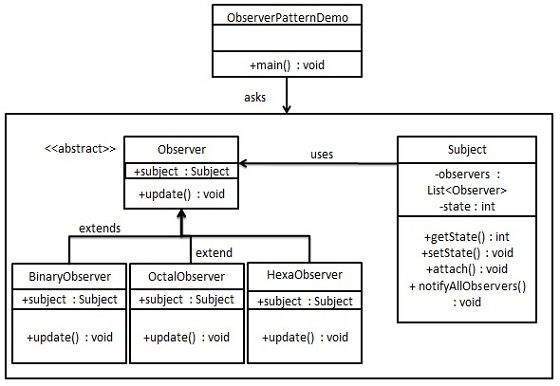
Example Code:
package com.pifl.exercise.design_pattern.observer;

import java.util.ArrayList;
import java.util.List;

import com.sun.org.apache.xalan.internal.xsltc.compiler.util.Util;

/**
 * Observer design pattern demo.
 * @author Ferry
 *
 */
public class ObserverDemo {
	public static void main(String [] args){
		ObserverDemo ob=new ObserverDemo();

		// Create subject
		Subject subject=ob.new Subject();

		// Register Observers to subject
		ob.new BinaryObserver(subject);
		ob.new OctalObserver(subject);
		ob.new HexaObserver(subject);

		// Subject state change or other changes is broadcasted to observers.
		// Observers will print what it receives.
		subject.setState(2);
		subject.setState(3);
		subject.setState(10);

	}

	class Subject{
		List<Observer> observers=new ArrayList<Observer>();
		Integer state;

		public void notifyAllObserver(){
			for(Observer ob: observers){
				ob.update();
			}
		}

		public void attach(Observer observer){
			observers.add(observer);
		}

		public Integer getState(){
			return state;
		}

		public void setState(Integer state){
			this.state=state;
			notifyAllObserver();
		}
	}

	abstract class Observer{
		protected Subject subject;
		protected String observerName;
		public abstract void update();
	}

	class BinaryObserver extends Observer{
		public BinaryObserver(Subject subject){
			this.observerName="BinaryObserver";
			this.subject=subject;
			this.subject.attach(this);
		}

		@Override
		public void update() {
			Util.println(observerName+": state change: "+subject.getState());
		}
	}

	class OctalObserver extends Observer{
		public OctalObserver(Subject subject){
			this.observerName="OctalObserver";
			this.subject=subject;
			this.subject.attach(this);
		}

		@Override
		public void update() {
			Util.println(observerName+": state change: "+subject.getState());
		}
	}

	class HexaObserver extends Observer{
		public HexaObserver(Subject subject){
			this.observerName="HexaObserver";
			this.subject=subject;
			this.subject.attach(this);
		}

		@Override
		public void update() {
			Util.println(observerName+": state change: "+subject.getState());
		}
	}
}
Sample output:
BinaryObserver: state change: 2
OctalObserver: state change: 2
HexaObserver: state change: 2
BinaryObserver: state change: 3
OctalObserver: state change: 3
HexaObserver: state change: 3
BinaryObserver: state change: 10
OctalObserver: state change: 10
HexaObserver: state change: 10
Variations of observer’s pattern
- Dispatcher Pattern
This observer pattern above is suitable for one subject having many Observers. If there are more than one subjects that should be monitored, the Observers registration should be done on each of the subjects. This can be solved with dispatcher where each of the subject (events) will have observers register to it, so in essence same observers can register to same event or vice verse (many to many).
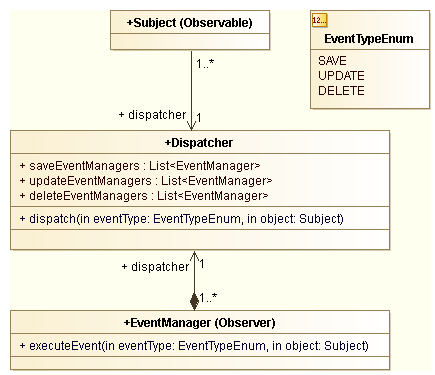
This pattern introduces a third actor, the Dispatcher. It is responsible for:
- managing registration of EventManagers (equivalent to the Observers)
- dispatching the event to all EventManagers
Please notice that we define an enum for the event type (EventTypeEnum). Indeed there is one list of EventManagersfor each distinct EventTypeEnum.
The routing based on the EventTypeEnum is done in the dispatch(EventTypeEnum eventType, Subject object) method body.
public class Dispatcher{
...
   public void dispatch(EventTypeEnum event, Subject object)
   {
    switch (event) {
        case SAVE:
            for(EventManager manager: this.saveEventManagers)
            {
                manager.executeEvent(event,object);
            }
            break;
        case UPDATE:
            for(EventManager manager: this.updateEventManagers)
            {
                manager.executeEvent(event,object);
            }
            break;
        case DELETE:
            for(EventManager manager: this.deleteEventManagers)
            {
                manager.executeEvent(event,object);
            }
            break;
        default:
            logger.error("Unknow EventType of type " + event.name());
        }

   }
...
} // End Dispatcher class

public class EventManager{
...
   public void executeEvent(EventTypeEnum event, Subject object) {
      ...
      // Processing here
      ...
   }
...
}
- Asynchronous dispatcher
In real projects, some processing can take time. With the Dispatcher pattern, the main thread is blocked until allEventManagers finish their task.
If would be interesting if we could delegate the processing to a separate thread. There comes the Asynchronous Dispatcher pattern.

Here we rely on a ThreadPoolTaskExecutor in each EventManager to delegate the work to a new thread. Please notice that the dispatching task is done in the main thread. The new thread delegation is done at the last step in eachEventManager.
One important point to take care when working in a multi-threaded context is concurrency issues. Indeed when we pass the Subject object to a new thread for processing, the main thread resumes its processing flow and the sameSubject object may be changed in this main thread.
Either you ensure that the processing flow in the main thread never change the Subject object, or you make a deep copy. It is quite expensive but there is no other way around to guard agains concurrent modifications.
Ref: https://doanduyhai.wordpress.com/2012/08/04/design-pattern-the-asynchronous-dispatcher/
Observer pattern can be used in conjunction with other patterns:
- Factory pattern – It’s very likely to use the factory pattern to create the Observers so no changes will be required even in the main framework. The new observers can be added directly in the configuration files.
- Template Method – The observer pattern can be used in conjunction with the Template Method Pattern to make sure that Subject state is self-consistent before notification
- Mediator Pattern – The mediator pattern can be used when we have cases of complex cases of many subjects an many observers. E.g. In the above, Dispatcher Pattern in conjunction with Observer Pattern.
Ref:
http://www.tutorialspoint.com/design_pattern/observer_pattern.htm
http://sourcemaking.com/design_patterns/Observer
http://en.wikipedia.org/wiki/Observer_pattern
Chain of Responsibilities Pattern
Admin chaining
AdminSettlementEventHandler->AdminStoreEvenHandler (extends FaultTolerantTimedQueueSwitchService) –> AdminStoreSettlementEventHandler –> TradeDateRollPersistenceHandler
http://en.wikipedia.org/wiki/Chain-of-responsibility_pattern
Strategy Pattern
Strategy Pattern – that enables an algorithm’s behavior to be elected at runtime. The strategy pattern defines a family of algorithms, encapsulates each algorithm, and makes the algorithms interchangeable within that family.
Strategy pattern is used when we have multiple algorithm for a specific task and client decides the actual implementation to be used at runtime.
One of the best example of this pattern is Collections.sort() method that takes Comparator parameter. Based on the different implementations of Comparator interfaces, the Objects are getting sorted in different ways.
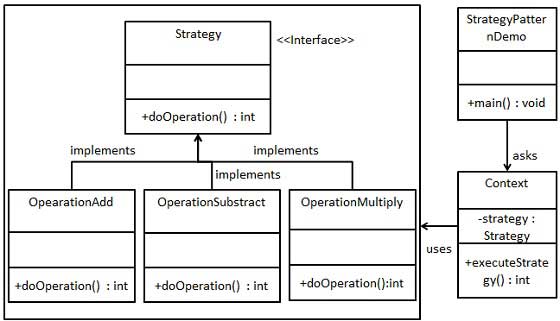
Example codes:
package com.pifl.exercise.design_pattern.strategy;

import com.pifl.exercise.util.Util;

public class StrategyPatternDemo {
	public static void main(String [] args){
		Context context=new Context();

		// Data is gathered
		context.getData(2, 3);

		// Different strategy/ algorithm can be chosen at run time.
		Util.println("Result add: "+context.executeStrategy(new OperationAdd()));
		Util.println("Result substract: "+context.executeStrategy(new OperationSubstract()));
		Util.println("Result multiple: "+context.executeStrategy(new OperationMultiply()));
	}
}

class Context{
	Strategy strategy;
	int num1=0;
	int num2=0;

	public void getData(int num1, int num2){
		this.num1=num1;
		this.num2=num2;
		Util.println("Data input: num1: "+num1+", num2: "+num2);
	}

	public int executeStrategy(Strategy strategy){
		return strategy.doOperation(num1, num2);
	}
}

interface Strategy{
	int doOperation(int num1, int num2);
}

class OperationAdd implements Strategy{
	@Override
	public int doOperation(int num1, int num2) {
		return num1+num2;
	}
}

class OperationSubstract implements Strategy{
	@Override
	public int doOperation(int num1, int num2) {
		return num1-num2;
	}
}

class OperationMultiply implements Strategy{
	@Override
	public int doOperation(int num1, int num2) {
		return num1*num2;
	}
}
Output:
Data input: num1: 2, num2: 3
Result add: 5
Result substract: -1
Result multiple: 6
Common example of strategy pattern in real life is custom sorting.
List<String> names = Arrays.asList("Anne", "Joe", "Harry");
Collections.sort(names, new Comparator<String>() {
  public int compare(String o1, String o2) {
    return o1.length() - o2.length();
  }
});
Ref:
http://www.tutorialspoint.com/design_pattern/strategy_pattern.htm
http://en.wikipedia.org/wiki/Strategy_pattern
http://java.dzone.com/articles/design-patterns-strategy
State Pattern
In State pattern a class behavior changes based on its state. This type of design pattern comes under behavior pattern.
In State pattern, we create objects which represent various states and a context object whose behavior varies as its state object changes.
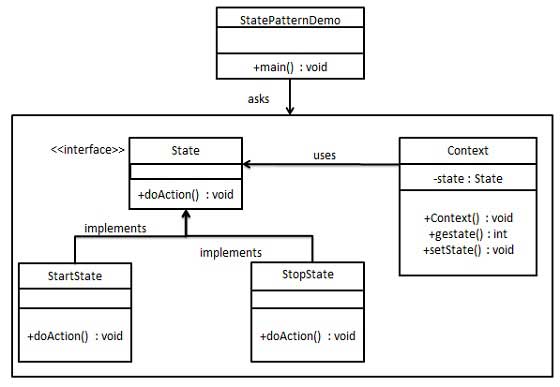
Step 1: Create an interface.
State.java
public interface State {
   public void doAction(Context context);
}
Step 2: Concrete class that implement the interface.
StartState.java
public class StartState implements State {

   public void doAction(Context context) {
      System.out.println("Player is in start state");
      context.setState(this);
   }

   public String toString(){
      return "Start State";
   }
}
StopState.java
public class StopState implements State {

   public void doAction(Context context) {
      System.out.println("Player is in stop state");
      context.setState(this);
   }

   public String toString(){
      return "Stop State";
   }
}
Step 3: Context class.
Contex.java
public class Context {
   private State state;

   public Context(){
      state = null;
   }

   public void setState(State state){
      this.state = state;
   }

   public State getState(){
      return state;
   }
}
Step 4: Use the context to see change in behavior when State change
StatePatternDemo.java
public class StatePatternDemo {
   public static void main(String[] args) {
      Context context = new Context();

      StartState startState = new StartState();
      startState.doAction(context);

      System.out.println(context.getState().toString());

      StopState stopState = new StopState();
      stopState.doAction(context);

      System.out.println(context.getState().toString());
   }
}
Output:
Player is in start state
Start State
Player is in stop state
Stop State
Token state implementation at Bank Of America
package com.pifl.exercise.design_pattern.state.boaState;

import com.pifl.exercise.util.Util;

/**
 * Demo. Token state in Bank of America.
 * Token can have different state and depend on the state only certain actions
 * can be performed.
 * Token state: Enable, Disable, Revoke (there are more states like: deactivate, provision
 * but only those 3 implemnted below).
 * @author Ferry
 */
public class TokenStateDemo {
	public static void main(String[] args) {
		// Set initial state in token context
		TokenContext context=new TokenContext(DisableState.getInstance());

		// Perform task based on action.
		context.getState().enableAction(context);
		context.getState().validateAction(context);
		context.getState().revokeAction(context);
		context.getState().validateAction(context); // Invalid action.
	}
}

/**
 * Token context which holds the current token state.
 * @author Ferry
 *
 */
class TokenContext {
	private TokenState state;

	public TokenContext(TokenState initialState) {
		this.state = initialState;
	}

	public TokenState getState() {
		return state;
	}

	public void setState(TokenState state) {
		this.state = state;
	}
}

/**
 * Token state abstract. This can also be an interface.
 * This contains all the default actions that can be performed
 * on the state machine.
 * @author Ferry
 *
 */
abstract class TokenState {
	protected String stateName;

	protected TokenState(String stateName) {
		this.stateName = stateName;
	}

	public Boolean validateAction(TokenContext context) {
		Util.println("Error: invalid state");
		return false;
	}

	public Boolean disableAction(TokenContext context) {
		Util.println("Error: invalid state");
		return false;
	}

	public Boolean enableAction(TokenContext context) {
		Util.println("Error: invalid state");
		return false;
	}

	public Boolean revokeAction(TokenContext context) {
		Util.println("Error: invalid state");
		return false;
	}

	public String getStateName() {
		return stateName;
	}

	public void setStateName(String stateName) {
		this.stateName = stateName;
	}
}

class DisableState extends TokenState {
	static private DisableState state = null;

	private DisableState() {
		super("DisableState");
	}

	public static DisableState getInstance() {
		if (state == null)
			state = new DisableState();
		return state;
	}

	@Override
	public Boolean enableAction(TokenContext context) {
		Util.println("Perform enable action");
		context.setState(EnableState.getInstance());
		return true;
	}

	@Override
	public Boolean revokeAction(TokenContext context) {
		Util.println("Perform revoke action");
		context.setState(RevokeState.getInstance());
		return true;
	}
}

class EnableState extends TokenState {
	static private EnableState state = null;

	private EnableState() {
		super("EnableState");
	}

	public static EnableState getInstance() {
		if (state == null)
			state = new EnableState();
		return state;
	}

	@Override
	public Boolean validateAction(TokenContext context) {
		Util.println("Peform validate action");
		return true;
	}

	@Override
	public Boolean disableAction(TokenContext context) {
		Util.println("Perform disable action");
		context.setState(DisableState.getInstance());
		return true;
	}

	@Override
	public Boolean revokeAction(TokenContext context) {
		Util.println("Perform revoke action");
		context.setState(RevokeState.getInstance());
		return true;
	}
}

class RevokeState extends TokenState {
	static private RevokeState state = null;

	public static RevokeState getInstance() {
		if (state == null)
			state = new RevokeState();
		return state;
	}

	RevokeState() {
		super("RevokeState");
	}

	@Override
	public Boolean revokeAction(TokenContext context) {
		Util.println("Perform revoke action");
		return true;
	}
}
Java 8
Interface
Default Methods
Multiple Defaults
With default functions in interfaces, there is a possibility that a class is implementing two interfaces with same default methods. The following code explains how this ambiguity can be resolved.
public interface vehicle {

   default void print() {
      System.out.println("I am a vehicle!");
   }
}

public interface fourWheeler {

   default void print() {
      System.out.println("I am a four wheeler!");
   }
}
First solution is to create an own method that overrides the default implementation.
public class car implements vehicle, fourWheeler {

   public void print() {
      System.out.println("I am a four wheeler car vehicle!");
   }
}
Second solution is to call the default method of the specified interface using super.
public class car implements vehicle, fourWheeler {

   public void print() {
      vehicle.super.print();
   }
}
Static Default Methods
An interface can also have static helper methods from Java 8 onwards.
public interface vehicle {

   default void print() {
      System.out.println("I am a vehicle!");
   }

   static void blowHorn() {
      System.out.println("Blowing horn!!!");
   }
}
Code ToDo:
- Event lister using interface
- Listiterator
— Next —